



Update Contact Information
Practitioners
-
As a practitioner, you can update your contact information by clicking on the Person Icon and then selecting My Account in the upper right corner.

- Updating your contact information will automatically generate a Notice of Change of Address, Notice of Change of Phone Number, or Notice of Change of Address and Phone Number that will be filed and served in each of your open cases, and any case closed within the past 6 months.
- If you have changed employers (IRS to private practice/private practice to IRS), contact admissions@ustaxcourt.gov to have your employer updated in DAWSON.
- REMINDER: Each person admitted to practice before the Court shall promptly notify the Court of any change in contact information. Rule 200(e), Tax Court Rules of Practice and Procedure.
Petitioners
Updating Petitioner Account Login and Service Email Address
-
Petitioners who wish to update the login and service email address for a DAWSON account should click on the Person Icon and then My Account in the upper right corner of the DAWSON screen.

- Input your new email address and click Save.
- A verification email from noreply@dawson.ustaxcourt.gov will be sent to your new email address. If you don’t see it, check your junk/spam folder. You must verify your new email address to change it in DAWSON. After 24 hours, the verification link will expire.
- Note: Changing the DAWSON account email address impacts the whole account, not just the email address for a particular case.
Updating Petitioner Mailing Address and Phone Number
-
A petitioner’s mailing address and phone number can be updated by clicking the Edit link by the petitioner’s name under the Case Information tab within a case.
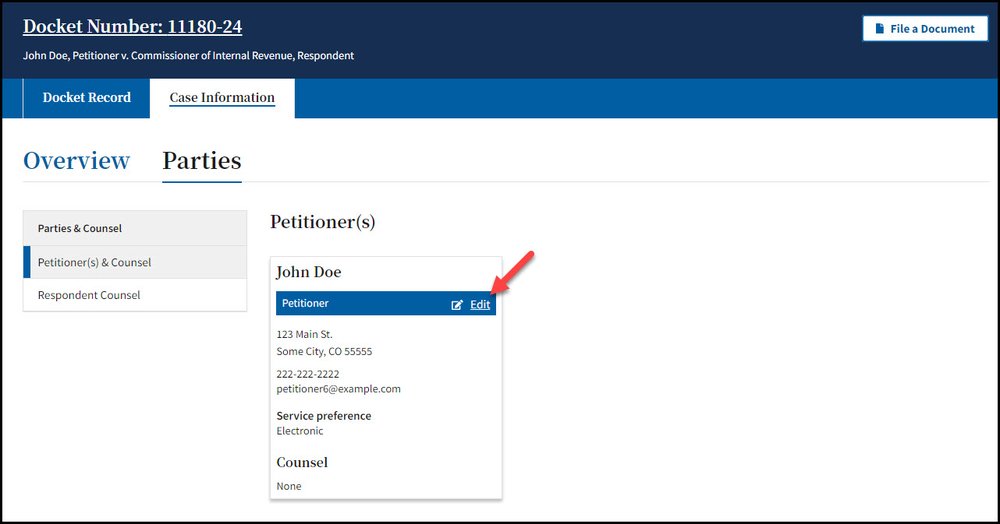
- Updating a petitioner’s mailing address or phone number will automatically generate a Notice of Change of Address, Notice of Change of Phone Number, or Notice of Change of Address and Phone Number in that specific case.
- If a petitioner has more than one case, the petitioner’s mailing address and phone number will need to be updated separately in each of their cases.